<?xml version="1.0" encoding="utf-8"?><feed xmlns="http://www.w3.org/2005/Atom" xml:lang="en"><generator uri="https://jekyllrb.com/" version="3.10.0">Jekyll</generator><link href="https://cristian.regolo.cc/feed.xml" rel="self" type="application/atom+xml" /><link href="https://cristian.regolo.cc/" rel="alternate" type="text/html" hreflang="en" /><updated>2026-02-20T21:14:20+00:00</updated><id>https://cristian.regolo.cc/feed.xml</id><title type="html">a blog on software engineering topics</title><subtitle>a blog on software engineering topics</subtitle><entry xml:lang="it"><title type="html">Lavorare in team da remoto ai tempi del COVID-19 (🇮🇹 italian version)</title><link href="https://cristian.regolo.cc/2020/04/08/lavorare-in-team-da-remoto-ai-tempi-del-covid19.html" rel="alternate" type="text/html" title="Lavorare in team da remoto ai tempi del COVID-19 (🇮🇹 italian version)" /><published>2020-04-08T10:00:00+00:00</published><updated>2020-04-08T10:00:00+00:00</updated><id>https://cristian.regolo.cc/2020/04/08/lavorare-in-team-da-remoto-ai-tempi-del-covid19</id><content type="html" xml:base="https://cristian.regolo.cc/2020/04/08/lavorare-in-team-da-remoto-ai-tempi-del-covid19.html"><![CDATA[<figure>
  <img src="/images/elbow-bump.jpeg" alt="elbow bump emoji" />
  <figcaption>
    <p>“Elbow bump” emoji (<a href="https://www.stephenpaulwright.com/" target="_blank">Stephen Paul Wright</a>)</p>
  </figcaption>
</figure>

<p>Molti sviluppatori software si trovano a lavorare da remoto in queste settimane
per via dell’emergenza COVID-19. Molte aziende hanno preso la decisione,
spontanea o forzata, di chiudere gli uffici e far lavorare da casa tutto o parte
del personale, praticamente adottando lo “Smart Working” (come si preferisce
chiamarlo in Italia) a tempo pieno.</p>

<p>Un sogno che si avvera per alcuni <em>software engineers</em>, una situazione non
necessariamente facile da gestire per altri. In questo breve post voglio
condividere alcuni suggerimenti pratici per affrontare al meglio questo periodo
di lavoro nel vostro team.</p>

<hr class="hrule" />

<p>Innanzitutto, non bisogna pensare che la situazione che stiamo vivendo in questo
momento sia la <em>normalità</em> del lavoro da remoto. La pandemia del coronavirus è
chiaramente un evento straordinario che coglie tutti ugualmente impreparati, sia
in Italia e all’estero. Persino aziende in cui normalmente il 100% dello staff
lavora da remoto, pur avendo una certa sensibilità culturale di base
sull’argomento, hanno messo in pratica processi e meccanismi aggiuntivi per
affrontare l’emergenza.</p>

<p>Siamo passati bruscamente dalla quotidianità del lavoro in ufficio, o magari da
una situazione di “lavoro flessibile” (in cui il lavoro da remoto è opzionale e
volontario, pur essendo incentivato) ad un periodo di lavoro in isolamento
forzato a tempo indeterminato.</p>

<blockquote>
  <p>In questo scenario un po’ surreale, non possiamo aspettarci che la
produttività di un team di sviluppo rimanga invariata.</p>
</blockquote>

<p>Tutti noi abbiamo personalità e reazioni potenzialmente differenti in queste
circostanze. Ci sono tante buone ragioni per cui un team efficiente possa
attraversare un periodo di scarsa energia e produttività.</p>

<p>C’è chi magari ha figli a cui badare durante la giornata o persone di cui
prendersi cura. Certi individui possono soffrire particolarmente una situazione
di isolamento in casa. Oppure ancora, il bombardamento mediatico costante
sull’emergenza coronavirus può provocare negatività, stress o ansia.</p>

<hr class="hrule" />

<p>Cosa fare per lavorare meglio insieme? Ecco un principio semplice e basilare:</p>

<blockquote>
  <p>Concentrarsi sulle persone come priorità assoluta, e poi sui processi del
team.</p>
</blockquote>

<p>Alcune idee per gestire le relazioni interpersonali lavorando da remoto:</p>

<ul>
  <li>
    <p>👋 <strong>Favorite le interazioni dirette fra due persone (1:1) rispetto ai meeting
che coinvolgono tutto il team.</strong> Almeno una volta al giorno, parlate con tutte
le persone del team anche solo per qualche minuto. L’ideale è una
videochiamata veloce, altrimenti va bene anche usare la chat. Interessatevi
sia di come procede il lavoro che dello stato mentale e della situazione
personale.</p>
  </li>
  <li>
    <p>🗓 <strong>Se il team si riunisce a cadenza regolare, continuate a farlo!</strong> Sprint
planning, daily stand-up, retrospettiva? Cercate di partecipare tutti, per
quanto possibile. Un buon modo per far scorrere via un lungo meeting di un’ora
è accorciarlo a 50 minuti, riservando 5 minuti all’inizio e alla fine della
call per chiacchierare informalmente del più e del meno.</p>
  </li>
  <li>
    <p>😌 <strong>Incoraggiate trasparenza e “vulnerabilità”.</strong> E’ ok sentirsi giù di tono,
è ok fare una pausa lunga per ricaricarsi, è ok cercare un collega per un
consiglio o una chiacchierata. Parlare della propria situazione personale o
del proprio stato mentale non è un tabù. In un team sano non c’è alcuna
vergogna nel dire cose tipo “oggi non sono qui con la testa” o “sono molto
distratto, possiamo rimandare questa conversazione a domani?”.</p>
  </li>
  <li>
    <p>👻 <strong>Pianificate momenti di svago comune.</strong> Una o due volte a settimana
organizzate una pausa caffè virtuale a tema libero. Decidete in anticipo
argomento e regole: possono partecipare i figli? E gli animali domestici? In
alternativa, aggiungete un po’ di imbarazzo e di risate ai meeting troppo
lunghi: tutti davanti alla webcam in abito elegante!</p>
  </li>
</ul>

<p>In secondo luogo, ecco dei suggerimenti per migliorare i processi del team:</p>

<ul>
  <li>
    <p>🗣 <strong>Over-comunicate, ovvero comunicate più di quanto avreste fatto prima (ma
fatelo bene!).</strong> In situazioni di stress alcune persone possono
involontariamente iniziare ad ignorare molto di ciò che succede intorno, come
forma di protezione da un sovraccarico di informazioni. Valutate bene
l’importanza e l’impatto di quello che volete comunicare: se è necessario che
tutti siano allineati con una certa decisione allora è bene comunicarlo a voce
e magari ripetetelo anche per iscritto, accertandosi che tutti siano in
condizioni di poter prestare attenzione.</p>
  </li>
  <li>
    <p>💻 <strong>Non aspettatevi che l’altra persona sia sempre davanti alla tastiera.</strong>
La comunicazione remota è asincrona per definizione. Se sono stati
pianificati dei meeting è opportuno rispettare presenze ed orari. Per tutto il
resto, tenete in conto che la persona a cui avete appena inviato un messaggio
potrebbe essere in pausa oppure impegnata in qualcosa da cui preferisce non
essere distratta. Una accortezza semplice: iniziate una conversazione in chat
indicando la priorità del messaggio, ad esempio “Hai 10 minuti per aiutarmi
con questo task? Anche a pomeriggio andrebbe bene”.</p>
  </li>
  <li>
    <p>🕐 <strong>Rendete note le vostre esigenze, e cercate di rispettare quelle degli
altri.</strong> Spesso gli orari di lavoro non coincidono esattamente nel team: ad
esempio, chi ha figli magari preferisce iniziare a lavorare molto presto e poi
spendere il pomeriggio con la famiglia. Mettetevi d’accordo in base alle
necessità quotidiane di ognuno, comunicate e rispettate rigorosamente gli
orari di inizio e fine giornata lavorativa. Sia i vostri che quelli degli
altri. Non va bene disconnettersi salutando tutti alle 6 del pomeriggio per
poi riaprire il laptop a tarda sera e rispondere alle email: voi rischiate di
esaurire presto le energie (<em>burnout</em>), e chi vi legge potrebbe sentirsi
obbligato a seguire gli stessi ritmi. Quando si stacca si stacca.</p>
  </li>
  <li>
    <p>✍️ <strong>Fate in modo che le decisioni possano essere prese in autonomia.</strong> Solo
le decisioni irreversibili, che non possono essere rivalutate in seguito,
dovrebbero richiedere l’attenzione e l’approvazione di tutto il team o di un
responsabile. Ogni altra decisione reversibile (tecnica o meno) , deve poter
essere delegabile ad un qualsiasi sottogruppo di individui. L’idea è evitare
colli di bottiglia dovuti alla comunicazione asincrona o a ritmi di lavoro
differenti. Attenzione però, perché questo meccanismo funzioni in modo sano
tutte le decisioni e le modifiche devono essere peer-reviewed, registrate
permanentemente ed accessibili a tutti.</p>
  </li>
  <li>
    <p>📊 <strong>Discutete obiettivi a breve termine e comunicate correttamente le
aspettative al di fuori del team.</strong> Evitate di definire obiettivi troppo
ambiziosi circa il carico di lavoro sostenibile. Questa è una considerazione
che dovrebbe valere sempre, ma è particolarmente importante nella situazione
di imprevedibilità attuale. Fissate obiettivi fattibili e riesaminateli di
frequente, eventualmente ricalibrandoli in base alle necessità e le
peculiarità di ogni individuo nel team. Fate in modo che i vostri obiettivi e
il loro stato di avanzamento siano facilmente visibili all’esterno del team,
comunicate con trasparenza e regolarità agli <em>stakeholder</em> cosicché le
aspettative non vengano fraintese o disattese.</p>
  </li>
</ul>

<hr class="hrule" />

<p>Lavorare in team da remoto in questa situazione di emergenza ed isolamento non è
per nulla banale: richiede di ricalibrare le proprie interazioni e di adattare i
ritmi di lavoro di tutto il team. Non esiste una soluzione unica applicabile in
ogni contesto. Fiducia, rispetto e trasparenza sono i capisaldi di sane e
produttive relazioni tra gli individui, tanto in generale quanto soprattutto in
un team. Lasciatevi guidare da questi valori e siate flessibili nell’adattarvi
alle situazioni.</p>]]></content><author><name></name></author><category term="remote working" /><category term="teamwork" /><category term="effective teams" /><category term="leadership" /><summary type="html"><![CDATA[Principi e suggerimenti pratici per rendere efficiente un team di sviluppo che lavora da remoto.]]></summary></entry><entry><title type="html">Linux internals: how interpreter scripts work</title><link href="https://cristian.regolo.cc/2017/01/29/linux-internals-how-interpreter-scripts-work.html" rel="alternate" type="text/html" title="Linux internals: how interpreter scripts work" /><published>2017-01-29T20:00:00+00:00</published><updated>2017-01-29T20:00:00+00:00</updated><id>https://cristian.regolo.cc/2017/01/29/linux-internals-how-interpreter-scripts-work</id><content type="html" xml:base="https://cristian.regolo.cc/2017/01/29/linux-internals-how-interpreter-scripts-work.html"><![CDATA[<p>Shell scripts are a common topic in Linux interview questions. Beside mastering
the <a href="http://tldp.org/LDP/abs/html/" target="_blank">art of Bash scripting</a>, it
is enlightening to understand how the kernel treats a script - any kind of
interpreter script - differently than, say, an ordinary ELF executable.</p>

<h3 id="definitions-first">Definitions, first!</h3>

<p>A script is an executable file that begins with a line (starting with the <code class="language-plaintext highlighter-rouge">#!</code>
characters) specifying a path to a script interpreter.</p>

<div class="language-plaintext highlighter-rouge"><div class="highlight"><pre class="highlight"><code>#! /path/to/interpreter [ args ]
</code></pre></div></div>

<p>On most Unix implementations, the space after the <code class="language-plaintext highlighter-rouge">#!</code> is optional.</p>

<h3 id="how-the-kernel-executes-a-script">How the kernel executes a script</h3>

<p>What happens when you execute a Python script like this one?</p>

<div class="language-python highlighter-rouge"><div class="highlight"><pre class="highlight"><code><span class="c1">#!/usr/bin/python
</span>
<span class="k">print</span> <span class="s">"Hello World"</span>
</code></pre></div></div>

<p>If you <code class="language-plaintext highlighter-rouge">strace</code> the script to intercept syscalls, this is what you should see:</p>

<div class="language-plaintext highlighter-rouge"><div class="highlight"><pre class="highlight"><code>$ strace -e trace=open,execve,write ./hello.py
execve("./hello.py", ["./hello.py"], [/* 59 vars */]) = 0
open("/etc/ld.so.cache", O_RDONLY|O_CLOEXEC) = 3
open("/lib/x86_64-linux-gnu/libpthread.so.0", O_RDONLY|O_CLOEXEC) = 3
open("/lib/x86_64-linux-gnu/libdl.so.2", O_RDONLY|O_CLOEXEC) = 3
open("/lib/x86_64-linux-gnu/libutil.so.1", O_RDONLY|O_CLOEXEC) = 3
open("/lib/x86_64-linux-gnu/libz.so.1", O_RDONLY|O_CLOEXEC) = 3
open("/lib/x86_64-linux-gnu/libm.so.6", O_RDONLY|O_CLOEXEC) = 3
open("/lib/x86_64-linux-gnu/libc.so.6", O_RDONLY|O_CLOEXEC) = 3
open("/usr/lib/python2.7/site.x86_64-linux-gnu.so", O_RDONLY) = -1 ENOENT (No such file or directory)
...
open("./hello.py", O_RDONLY)             = 3
write(1, "Hello World\n", 12Hello World
)           = 12
+++ exited with 0 +++
</code></pre></div></div>

<p>There is exactly one <code class="language-plaintext highlighter-rouge">execve()</code> call, with the script filename as first
argument: no Python interpreter is being executed here!</p>

<p>Well, what happens <a href="http://lxr.free-electrons.com/source/fs/binfmt_script.c" target="_blank">under the
hood</a>
is the kernel recognizing such executable file as an interpreter script, given
it starts with the sha-bang magic numbers (<code class="language-plaintext highlighter-rouge">0x23 0x21</code>). The whole first line of
the file is then split into an interpreter path and (optional) args. The
interpreter is located on the filesystem and invoked with the script path as
first argument.</p>

<p>In the example above, any syscall after the <code class="language-plaintext highlighter-rouge">execve()</code> is actually issued by the
Python interpreter binary, although you can’t directly see it being executed.</p>

<h3 id="interpreter-and-scripts-arguments">Interpreter and script’s arguments</h3>

<p>The first line of a script file specifies the interpreter path and optional
arguments for the interpreter itself. Any other command line argument is
appended after the script path. Let’s explain this with an example:</p>

<div class="language-plaintext highlighter-rouge"><div class="highlight"><pre class="highlight"><code>$ cat script.sh
#!/home/cristian/myecho interp_arg1 interp_arg2
</code></pre></div></div>

<p>The <code class="language-plaintext highlighter-rouge">myecho</code> interpreter is a little C program that outputs <code class="language-plaintext highlighter-rouge">argv</code>:</p>

<div class="language-c highlighter-rouge"><div class="highlight"><pre class="highlight"><code><span class="cp">#include</span> <span class="cpf">&lt;stdio.h&gt;</span><span class="cp">
</span>
<span class="kt">int</span> <span class="nf">main</span><span class="p">(</span><span class="kt">int</span> <span class="n">argc</span><span class="p">,</span> <span class="kt">char</span><span class="o">*</span> <span class="n">argv</span><span class="p">[])</span> <span class="p">{</span>
  <span class="k">for</span> <span class="p">(</span><span class="kt">int</span> <span class="n">i</span> <span class="o">=</span> <span class="mi">0</span><span class="p">;</span> <span class="n">i</span> <span class="o">&lt;</span> <span class="n">argc</span><span class="p">;</span> <span class="n">i</span><span class="o">++</span><span class="p">)</span> <span class="p">{</span>
    <span class="n">printf</span><span class="p">(</span><span class="s">"%d -&gt; %s</span><span class="se">\n</span><span class="s">"</span><span class="p">,</span> <span class="n">i</span><span class="p">,</span> <span class="n">argv</span><span class="p">[</span><span class="n">i</span><span class="p">]);</span>
  <span class="p">}</span>
<span class="p">}</span>
</code></pre></div></div>

<p>When executing <code class="language-plaintext highlighter-rouge">script.sh</code> with additional command line arguments, output is:</p>

<div class="language-plaintext highlighter-rouge"><div class="highlight"><pre class="highlight"><code>$ ./script.sh cli_arg1 cli_arg2
0 -&gt; /home/cristian/myecho
1 -&gt; interp_arg1 interp_arg2
2 -&gt; ./script.sh
3 -&gt; cli_arg1
4 -&gt; cli_arg2
</code></pre></div></div>

<p>Here you see that inside <code class="language-plaintext highlighter-rouge">execve()</code> the arguments are re-arranged in this
manner:</p>

<div class="language-plaintext highlighter-rouge"><div class="highlight"><pre class="highlight"><code>interpreter-path interpreter-args script-path script-args
</code></pre></div></div>

<p>On Linux, the interpreter args are parsed as a single line (this explains why
<code class="language-plaintext highlighter-rouge">interp_arg1 interp_arg2</code> are printed as a single <code class="language-plaintext highlighter-rouge">argv</code> entry), and this may be
the source of portability issues. You should also be aware that, on Linux, the
total length of the first line of a script (i.e. sha-bang + interpreter-path +
interpreter-args) cannot be longer than <a href="http://lxr.free-electrons.com/source/include/uapi/linux/binfmts.h" target="_blank">128
characters</a>
(including newline).</p>

<h3 id="the-problem-with-path">The problem with PATH</h3>

<p>The interpreter path is usually an absolute path (although a relative path can
still be used). In fact, the <code class="language-plaintext highlighter-rouge">$PATH</code> mechanism of your shell is meaningless in
kernel space (remember everything we’re discussing here happens inside an
<code class="language-plaintext highlighter-rouge">execve()</code> syscall). The interpreter path must be the exact location of an
executable file.</p>

<p>For the sake of portability, the <code class="language-plaintext highlighter-rouge">env(1)</code> utility is often used as a workaround.
Assuming that <code class="language-plaintext highlighter-rouge">env</code> is commonly installed under the standard <code class="language-plaintext highlighter-rouge">/usr/bin/env</code>
path, this small executable is then used as a trampoline to start the real
interpreter, which then needs to be located somewhere in the user’s PATH.</p>

<div class="language-python highlighter-rouge"><div class="highlight"><pre class="highlight"><code><span class="c1">#!/usr/bin/env python
</span>
<span class="k">print</span> <span class="s">"Hello World"</span>
</code></pre></div></div>

<p>In other words, <code class="language-plaintext highlighter-rouge">#!/usr/bin/env python</code> executes <code class="language-plaintext highlighter-rouge">env</code> as an interpreter,
passing <code class="language-plaintext highlighter-rouge">python</code> as an interpreter-arg. <code class="language-plaintext highlighter-rouge">env</code> itself is
<a href="http://git.savannah.gnu.org/gitweb/?p=coreutils.git;a=blob;f=src/env.c" target="_blank">usually</a>
<a href="https://git.busybox.net/busybox/tree/coreutils/env.c" target="_blank">implemented</a>
with an <code class="language-plaintext highlighter-rouge">execvp(3)</code> call - a C library call - that searches for the given
executable in PATH.</p>

<h3 id="nesting-the-interpreter">Nesting the interpreter</h3>

<p>Some UNIX implementations permit the interpreter of a script to itself be a
script. On Linux, this kind of “executable search” is recursive up to an
hardcoded limit of <a href="http://lxr.free-electrons.com/source/fs/exec.c#L1560" target="_blank">four
recursions</a>.</p>

<div class="language-plaintext highlighter-rouge"><div class="highlight"><pre class="highlight"><code>$ cat nested.sh
#!./nested.sh

$ ./nested.sh
bash: ./nested.sh: /nested.sh: bad interpreter: Too many levels of symbolic links
</code></pre></div></div>

<h3 id="the-setuid-bit-is-ignored">The setuid bit is ignored</h3>

<p>On Linux, and in other Unix implementations, the <code class="language-plaintext highlighter-rouge">setuid</code> bit on scripts in
ignored for security reasons.</p>

<p>We can prepare a small test program:</p>

<div class="language-c highlighter-rouge"><div class="highlight"><pre class="highlight"><code><span class="cp">#include</span> <span class="cpf">&lt;unistd.h&gt;</span><span class="cp">
#include</span> <span class="cpf">&lt;stdio.h&gt;</span><span class="cp">
</span>
<span class="kt">int</span> <span class="nf">main</span><span class="p">()</span> <span class="p">{</span>
  <span class="n">printf</span><span class="p">(</span><span class="s">"real=%d effective=%d</span><span class="se">\n</span><span class="s">"</span><span class="p">,</span> <span class="n">getuid</span><span class="p">(),</span> <span class="n">geteuid</span><span class="p">());</span>
<span class="p">}</span>
</code></pre></div></div>

<p>The <code class="language-plaintext highlighter-rouge">setuid</code> permission on the binary executable works as expected:</p>

<div class="language-plaintext highlighter-rouge"><div class="highlight"><pre class="highlight"><code>$ ./test-setuid
real=1000 effective=1000

$ sudo chown root test-setuid &amp;&amp; sudo chmod +s test-setuid

$ ./test-setuid
real=1000 effective=0
</code></pre></div></div>

<p>If we do the same job on a script, the <code class="language-plaintext highlighter-rouge">setuid</code> bit is ignored instead:</p>

<div class="language-plaintext highlighter-rouge"><div class="highlight"><pre class="highlight"><code>$ cat test-setuid.sh
#!/bin/bash

id -u

$ ./test-setuid.sh
1000

$ sudo chown root test-setuid.sh &amp;&amp; sudo chmod +s test-setuid.sh

$ ./test-setuid.sh
1000
</code></pre></div></div>

<h3 id="further-reading">Further reading</h3>

<p>In the description above, I’ve mentioned a few times that some details are very
Linux-specific. This is because, unfortunately, the <code class="language-plaintext highlighter-rouge">#!</code> mechanism is not
officially part of any Unix specification.
<a href="http://www.in-ulm.de/~mascheck/various/shebang/" target="_blank">Here</a> are
described more in-depth details about the differences between existing Unix
flavours and how they evolved over time.</p>]]></content><author><name></name></author><category term="linux" /><category term="kernel" /><category term="scripting" /><category term="setuid" /><summary type="html"><![CDATA[How do scripts work on Linux? How does the kernel find the correct interpreter for a script and run it with arguments? In this post we'll deep-dive into kernel code that handles scripts execution and will show some of the Linux peculiarities with practical examples.]]></summary></entry><entry><title type="html">Life in a Redis Cluster: Meet and Gossip with your neighbors</title><link href="https://cristian.regolo.cc/2015/09/05/life-in-a-redis-cluster.html" rel="alternate" type="text/html" title="Life in a Redis Cluster: Meet and Gossip with your neighbors" /><published>2015-09-05T15:00:00+00:00</published><updated>2015-09-05T15:00:00+00:00</updated><id>https://cristian.regolo.cc/2015/09/05/life-in-a-redis-cluster</id><content type="html" xml:base="https://cristian.regolo.cc/2015/09/05/life-in-a-redis-cluster.html"><![CDATA[<p>Redis Cluster is going to change your view of Redis.</p>

<p>Since release
<a href="https://groups.google.com/d/msg/redis-db/dO0bFyD_THQ/Uoo2GjIx6qgJ" target="_blank">3.0.0</a>,
Redis is able to operate in Cluster mode, providing <strong>automatic data sharding</strong>
across multiple nodes with a high degree of <strong>fault tolerance</strong>.</p>

<p>Well known <a href="http://redis.io/topics/partitioning" target="_blank">techniques</a>
have been around for quite some time now to partition the data set and scale
Redis to <a href="http://highscalability.com/blog/2014/8/27/the-12m-opssec-redis-cloud-cluster-single-server-unbenchmark.html" target="_blank">many
instances</a>,
the most simple and effective one being client side partitioning implemented
with consistent hashing. Redis Cluster goes a step forward in the direction of
high scalability: it has been designed from the beginning with focus on high
performance and with the aim to provide a set of consistency and availability
guarantees that are suitable for different kinds of applications.</p>

<p>There is an increasing amount of documentation around Redis Cluster, including
official resources like the quick-start
<a href="http://redis.io/topics/cluster-tutorial" target="_blank">tutorial</a> for end
users and detailed <a href="http://redis.io/topics/cluster-spec" target="_blank">tech
specifications</a> for
developers. In this post we’ll focus on the cluster networking internals, to
give you an overview of the role and the importance of inter-node
communications.</p>

<h3 id="redis-cluster-topology">Redis Cluster topology</h3>

<p>A set of isolated Redis instances, with proper configuration and guidance, can
be joined to form a Redis Cluster. The minimal working cluster is composed of
three master nodes, but Redis Cluster is designed and tested to scale
efficiently up to 1000 nodes. In our examples, for the sake of simplicity, we’ll
consider only sets of masters without attached slaves.</p>

<p>Nodes in a Redis Cluster talk to each other using the <strong>Cluster Bus</strong>. Every
node is connected to every other node through a dedicated tcp connection, thus
forming a <a href="https://en.wikipedia.org/wiki/Network_topology#Mesh" target="_blank">fully connected
network</a>.
This node-to-node communication channel is used exclusively for cluster
operations (e.g. configuration update, failure detection, failover
authorization) and its links are kept separate from normal client connections.</p>

<p>Nodes exchange data over the bus using a binary protocol, which is deliberately
undocumented because it is not intended to be used by clients. Of course,
<a href="https://github.com/antirez/redis/blob/unstable/src/cluster.h" target="_blank">code</a>
<a href="https://github.com/antirez/redis/blob/unstable/src/cluster.c" target="_blank">speaks</a>
and Redis source code is always worth studying.</p>

<h3 id="cluster-heartbeat-ping--pong-packets">Cluster heartbeat: PING / PONG packets</h3>

<p>Under normal conditions, nodes of the cluster continuously exchange PING and
PONG packets over the bus (remember we’re talking about raw binary packets here,
not to be confused with the
<a href="http://redis.io/commands/ping" target="_blank">PING</a> client command).</p>

<p>This packet flow constitutes the heartbeat mechanism of the cluster, a means of
information propagation fundamental to some key features such as, for example,
node auto-discovery and failure detection. In fact, each ping/pong packet
carries important pieces of information about the state of the cluster from the
point of view of the sender node, like hash slots distribution, configuration
information and additional data about other trusted nodes.</p>

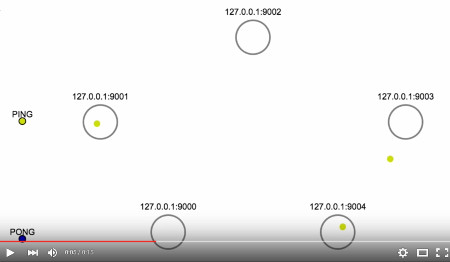
<p>This animation<sup id="fnref:animation" role="doc-noteref"><a href="#fn:animation" class="footnote" rel="footnote">1</a></sup> shows the heartbeat packet flow in a cluster of 5
master nodes under normal operation. While it is extremely slowed down, you can
see that every PING packet triggers a PONG reply from the receiver node:</p>

<div style="text-align: center;">
  <p><a href="https://youtu.be/0BLmM73y3oo" title="Redis Cluster heartbeat: PING / PONG packets" target="_blank"><img src="/images/redis-cluster-ping.jpg" alt="Redis Cluster heartbeat: PING / PONG packets" /></a></p>
</div>

<p>In order to avoid exchanging too many packets on the network, usually a node
will ping only a few (not all) randomly chosen nodes every second. However, the
<code class="language-plaintext highlighter-rouge">cluster-node-timeout</code> configuration parameter controls (among other things) the
volume of heartbeat packets exchanged between nodes: each node in the cluster
will always try to ping every other node that didn’t send a PING or received a
PONG for longer than half this timeout value.</p>

<p>In other words, information about other nodes is refreshed after -at most- half
<code class="language-plaintext highlighter-rouge">cluster-node-timeout</code> milliseconds, so this value significantly affects the
hearthbeat traffic. Although packets are usually small in size, a lower timeout
will cause a sensibly higher network traffic in a very large cluster. This
setting is also involved in failure detection: if a node seems to be
unreachable, before complete timeout expiration the sender will try to renew the
underlying tcp connection and ping it again.</p>

<h3 id="cluster-bootstrap-meet-packets">Cluster bootstrap: MEET packets</h3>

<p>Fundamental to the bootstrap process of a Redis Cluster and, in general, to the
addition of new nodes, is the MEET packet. Its binary structure is similar to
the PING / PONG packets, but a node receiving a MEET message will accept the
sender as a new trusted node of the cluster.</p>

<p>In fact, being part of a Redis Cluster is a matter of being trusted by your
neighbors. While any node in a cluster will blindly reply to incoming PINGs on
the cluster bus port, it won’t process any other sensible packet nor will
consider another Redis instance as part of the cluster until such untrusted
source introduces itself with a MEET packet.</p>

<p>To stimulate a new node to join an existing Redis Cluster we need to use the
<a href="http://redis.io/commands/cluster-meet" target="_blank">CLUSTER MEET</a> command.
The syntax</p>

<p><code class="language-plaintext highlighter-rouge">CLUSTER MEET ip port</code></p>

<p>will force Redis, when configured in cluster mode, to send a MEET packet to the
specified node. Note that <code class="language-plaintext highlighter-rouge">port</code> here is the bus port, and any node of the
cluster can be used as target, as we’re going to explain.</p>

<p>The creation of a Redis Cluster is usually handled with the <code class="language-plaintext highlighter-rouge">redis-trib</code> tool, a
Ruby utility that simplifies cluster operations for sysadms. What this script
actually does in order to bootstrap a cluster of N nodes, is a kind of brute
force approach:</p>

<ol>
  <li>the first Redis instance passed on the command line is selected as a trusted
node,</li>
  <li>then a CLUSTER MEET command is sent to every other node to meet with this
first one.</li>
</ol>

<p>This means that initially the trust relationship between cluster nodes is
effectively forced by the sysadm.</p>

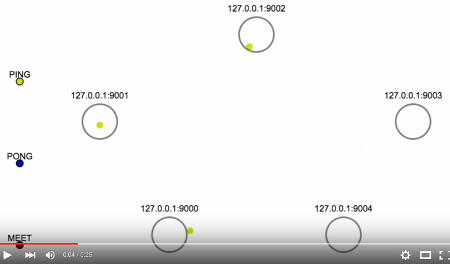
<p>In this animation you can see the bootstrap phase of a Redis Cluster with 5
masters:</p>

<div style="text-align: center;">
  <p><a href="https://youtu.be/JwZnM4sh5CQ" title="Redis Cluster bootstrap: MEET packets" target="_blank"><img src="/images/redis-cluster-meet.jpg" alt="Redis Cluster bootstrap: MEET packets" /></a></p>
</div>

<p>Here node 9000 is the first trusted node, so every other node meets with it and
receives a PONG reply. After some time that node 9000 knows about every other
node in the cluster, you can see other nodes spontaneously getting in touch with
each other through additional MEET messages, thus forming the fully connected
network of an operational Redis Cluster. How did this information propagate
across all nodes?</p>

<h3 id="gossip-rumors-worth-listening-to">Gossip: rumors worth listening to</h3>

<p>Redis Cluster uses a simple
<a href="https://en.wikipedia.org/wiki/Gossip_protocol" target="_blank">Gossip</a>
protocol in order to quickly spread information through any connected node.
Heartbeat packets carry information on their own, but they also contain a
special header for gossip data.</p>

<p>This section contains information about a few random nodes among the set of
nodes known to the sender. The number of entries included in the gossip header
is proportional to the size of the cluster (usually 1/10 of the nodes, but may
be empty as well in some cases). The trick is: almost any heartbeat packet
contains data about some (a few) nodes of the cluster from the point of view of
the sender. This is how information propagates quickly at large scale without
requiring an exponential number of messages exchanged.</p>

<p>Through gossip, all nodes eventually converge to a common shared view of the
state of the cluster. This continuous information exchange is crucial in various
point in life of the cluster like, for example, at bootstrap time and during
node or network failures. In particular, when connecting a new node to an
existing cluster, the <code class="language-plaintext highlighter-rouge">redis-trib</code> script just issues a single <code class="language-plaintext highlighter-rouge">CLUSTER MEET</code>
command, then gossip makes the magic of auto-discover.</p>

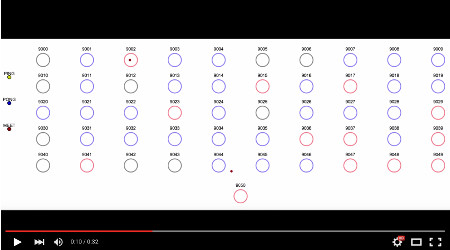
<p>This last animation shows in details what happens when a new node is connected
to a cluster of 50 nodes:</p>

<div style="text-align: center;">
  <p><a href="https://youtu.be/0Q2wWtT6xog" title="Redis Cluster: adding a new node" target="_blank"><img src="/images/redis-cluster-add-node.jpg" alt="Redis Cluster: adding a new node" /></a></p>
</div>

<p>The video only shows MEET messages and PING / PONG packets that carry the
information of the new node (so a lot of other heartbeat traffic is not
represented). Nodes are initially in gray as they don’t know about the newly
connected Redis instance, nor it knows about them. What can happen here is
either:</p>

<ol>
  <li>the new node gets to know about a cluster node first (which is then
highlighted in blue), or</li>
  <li>a cluster node is informed about the new node first (in this case is
highlighted in red).</li>
</ol>

<p>This second event happens either by directly receiving a MEET or through a
gossip info from a peer. In the example above, node 9050 meets with 9049 and
receives gossip info by the PONG reply, then the information quickly flows and
the nodes eventually form a fully connected graph again.</p>

<p>It is worth noting that is much easier for the new node to discover existing
nodes (i.e. case 1 is the majority), because every MEET/PONG exchange carries
data about potentially unknown nodes. If you’re wondering how fast it is, the 50
nodes above were configured with a <code class="language-plaintext highlighter-rouge">cluster-node-timeout</code> of 500 ms and the
auto-discovery phase converged in about 400 ms.</p>

<div class="footnotes" role="doc-endnotes">
  <ol>
    <li id="fn:animation" role="doc-endnote">
      <p>Animations in this post were created from real data using this <a href="https://github.com/aristus/packet-flight" target="_blank">packet-flight</a> tool hacked by <a href="https://vimeo.com/carlosb" target="_blank">Carlos Bueno</a>. You may want to have a look at his famous <a href="https://vimeo.com/14439742" target="_blank">HTTP request</a> visualization. <a href="#fnref:animation" class="reversefootnote" role="doc-backlink">&#8617;</a></p>
    </li>
  </ol>
</div>]]></content><author><name></name></author><category term="redis" /><category term="redis cluster" /><category term="gossip protocols" /><category term="networking" /><summary type="html"><![CDATA[How does Redis Cluster works? How are single instances connected within a cluster and what is the process for bootstrapping a new cluster? In this post we'll explore Redis Cluster internals and will use some cool animations to demonstrate how nodes communicates through a gossip protocol.]]></summary></entry><entry><title type="html">Introducing the Geo API in Redis</title><link href="https://cristian.regolo.cc/2015/07/07/introducing-the-geo-api-in-redis.html" rel="alternate" type="text/html" title="Introducing the Geo API in Redis" /><published>2015-07-07T08:24:00+00:00</published><updated>2015-07-07T08:24:00+00:00</updated><id>https://cristian.regolo.cc/2015/07/07/introducing-the-geo-api-in-redis</id><content type="html" xml:base="https://cristian.regolo.cc/2015/07/07/introducing-the-geo-api-in-redis.html"><![CDATA[<p>Since a few days, the <a href="https://github.com/antirez/redis/blob/unstable/src/geo.c" target="_blank">Geo API</a> has been introduced in Redis.
At the time of writing, the work is quite complete but still considered in
progress: everything you’ll read here is actually available in the unstable
development branch and not yet released for production (plans are to release it
with the next <a href="http://antirez.com/news/89" target="_blank">3.2</a> version).</p>

<p>The Geo API consists of a set of new commands that add support for storing and
querying pairs of longitude/latitude coordinates into Redis keys. <strong>GeoSet</strong> is
the name of the data structure holding a set of <code class="language-plaintext highlighter-rouge">(x,y)</code> coordinates. Actually,
there isn’t any new data structure under the hood: a GeoSet is simply
a Redis SortedSet.</p>

<p>Let’s have a quick look at the syntax of the new <code class="language-plaintext highlighter-rouge">GEO*</code> commands:</p>

<ul>
  <li><code class="language-plaintext highlighter-rouge">GEOADD key long lat name [long2 lat2 name2 ... longN latN nameN]</code></li>
</ul>

<p><em>Add a member with the specified long/lat coordinates to a GeoSet.</em></p>

<ul>
  <li><code class="language-plaintext highlighter-rouge">GEORADIUS key long lat radius unit [WITHDIST] [WITHHASH] [WITHCOORD] [ASC|DESC] [COUNT count]</code></li>
</ul>

<p><em>Search a GeoSet for members within ‘radius’ distance from given coordinates.
Valid units for radius are m, km, ft, mi.</em></p>

<ul>
  <li><code class="language-plaintext highlighter-rouge">GEORADIUSBYMEMBER key member radius unit [WITHDIST] [WITHHASH] [WITHCOORD] [ASC|DESC] [COUNT count]</code></li>
</ul>

<p><em>The same as GEORADIUS, but the search is centered on the coordinates of a
member of the GeoSet.</em></p>

<ul>
  <li><code class="language-plaintext highlighter-rouge">GEOPOS key elem1 elem2 ... elemN</code></li>
</ul>

<p><em>Return the long/lat coordinates of each specified element in a GeoSet.</em></p>

<ul>
  <li><code class="language-plaintext highlighter-rouge">GEODIST key elem1 elem2 [unit]</code></li>
</ul>

<p><em>Return the distance in unit (meters by default) between elem1 and elem2 in a
GeoSet.</em></p>

<ul>
  <li><code class="language-plaintext highlighter-rouge">GEOHASH key elem1 elem2 ... elemN</code></li>
</ul>

<p><em>Return the GeoHash string representation (an array of 11 characters) of the
coordinates of the specified elements.</em></p>

<ul>
  <li><code class="language-plaintext highlighter-rouge">GEOENCODE long lat [radius unit]</code></li>
</ul>

<p><em>Translate the given coordinates to the GeoHash integer value with highest
accuracy.</em></p>

<ul>
  <li><code class="language-plaintext highlighter-rouge">GEODECODE hash</code></li>
</ul>

<p><em>Translate a GeoHash integer value back to a pair of coordinates.</em></p>

<p>I think at this point you’re wondering what a GeoHash is … before digging into
details let’s have a visual example.</p>

<h2 id="building-an-hotel-reservation-system-with-map-search">Building an Hotel Reservation system with map search</h2>

<p>A picture is worth a thousand words, so let’s build a real-world example.</p>

<p>I downloaded (thanks to <a href="http://overpass-turbo.eu" target="_blank">Overpass turbo</a> a small dataset with the coordinates of a set of hotels in Rome (a very small set indeed) and imported it into Redis.
This is the <a href="https://gist.github.com/cristiangreco/e806521f70370eaa1c1b" target="_blank">GeoJSON
dataset</a>
and an example script to load it. It is as easy as adding coordinates with
symbolic names in a GeoSet and then populating a key for each hotel data (using
such names in order to later retrieve it).</p>

<div class="language-plaintext highlighter-rouge"><div class="highlight"><pre class="highlight"><code>geoadd hotels 12.4844774 41.9184129 h:259299923 12.4920147 41.9175913 h:261733735 ...
set h:259299923 '{"geometry": {"type": "Point", "coordinates": [12.4844774, 41.9184129]} ...'
set h:261733735 '{"geometry": {"type": "Point", "coordinates": [12.4920147, 41.9175913]} ...'
...
</code></pre></div></div>

<p>All the hotels visualized on a map:</p>

<div style="text-align: center">
  <p><img src="/images/all.png" alt="all Hotels on map" /></p>
</div>

<p>Now let’s suppose you’re searching for an accommodation near <a href="https://en.wikipedia.org/wiki/Roma_Termini_railway_station" target="_blank">Stazione
Termini</a>
(not really the best place to stay in Rome). How do you retrieve the hotels
within 1km from your point of interest?</p>

<div class="language-plaintext highlighter-rouge"><div class="highlight"><pre class="highlight"><code>GEORADIUS hotels 12.499705 41.902372 1 km
 1) "h:530719587"
 2) "h:3412957318"
 3) "h:3554601725"
 4) "h:1743613641"
 5) "h:3292538681"
...
</code></pre></div></div>

<p>Fine, but a friend of mine suggested me a cheap accommodation near Termini,
let’s say property known as <code class="language-plaintext highlighter-rouge">h:2309332158</code>. Ouch, no availability for my
dates… let’s search for the accommodations at shortest distance:</p>

<div class="language-plaintext highlighter-rouge"><div class="highlight"><pre class="highlight"><code>GEORADIUSBYMEMBER hotels h:2309332158 1 km withdist asc
 1) 1) "h:2309332158"
    2) "0.0000"
 2) 1) "h:3403814918"
    2) "0.0627"
 3) 1) "h:3403814919"
    2) "0.0657"
 4) 1) "h:3403817806"
    2) "0.0688"
 5) 1) "h:2397317566"
    2) "0.0928"
...
</code></pre></div></div>

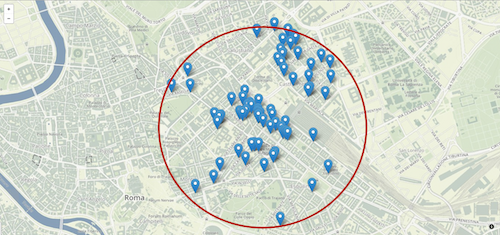
<p>This is how the result could be presented to the user:</p>

<div style="text-align: center">
  <p><img src="/images/100.png" alt="1km range search" /></p>
</div>

<p>Let’s retrieve the position on the map of two of the hotels in this list:</p>

<div class="language-plaintext highlighter-rouge"><div class="highlight"><pre class="highlight"><code>GEOPOS hotels h:3403814919 h:3403817806
1) 1) "12.497514188289642"
   2) "41.899867204456598"
2) 1) "12.497755587100983"
   2) "41.900039565495433”
</code></pre></div></div>

<p>Quite close to each other? Yeah, say less than 30 meters:</p>

<div class="language-plaintext highlighter-rouge"><div class="highlight"><pre class="highlight"><code>GEODIST hotels h:3403814919 h:3403817806
"27.693296515757325"
</code></pre></div></div>

<h3 id="under-the-hood-geohashing">Under the hood: GeoHashing</h3>

<p>We said before that a GeoSet in Redis is implemented as a SortedSet (actually
the <code class="language-plaintext highlighter-rouge">GEOADD</code> command translates your input to a proper <code class="language-plaintext highlighter-rouge">ZADD</code> command). All
members in a SortedSet have a score value associated used for sorting (indeed)
and range indexing. But how is it possible to translate a pair of coordinates to
a score?</p>

<p><a href="https://en.wikipedia.org/wiki/Geohash" target="_blank">GeoHashing</a> is a
technique to encode a pair of longitude/latitude coordinates into a single ASCII
string (usually encoded <code class="language-plaintext highlighter-rouge">base32</code>). It all started with the
<a href="http://geohash.org" target="_blank">geohash.org</a> service as a way to
represent locations with short and easily shareable urls.</p>

<p>The GeoHash encoding algorithm offers arbitrary precision. The accuracy of the
representation depends on the number of bits used. Also, the raw binary form can
be interpreted as an integer instead of a base32 string. This is the intuition
behind the usage of GeoHash as a score for a SortedSet.</p>

<p>The integer GeoHash implementation in Redis derives from
<a href="https://github.com/yinqiwen/ardb" target="_blank">Ardb</a>, but has been
completely reimplemented by <a href="https://matt.sh/redis-geo#_origin-story" target="_blank">Matt
Stancliff</a> and is
based on a 52bit integer representation (which gives an accuracy of less than 1
meter). Why 52bit? Because SortedSet uses double values for members scores, and
a double can safely hold a 52bit integer without loss of accuracy.</p>

<p>The GeoHash score of a GeoSet member can be exposed with a <code class="language-plaintext highlighter-rouge">ZRANGE</code> command
(GeoSets are SortedSets, right?):</p>

<div class="language-plaintext highlighter-rouge"><div class="highlight"><pre class="highlight"><code>ZRANGE hotels 0 -1 withscores
  1) "h:2138691946"
  2) "3480341633710855"
  3) "h:2302346446"
  4) "3480341645075993"
  5) "h:2985974223"
  6) "3480341646134189"
...
</code></pre></div></div>

<p>The corresponding base32 string representation can be obtained in this way:</p>

<div class="language-plaintext highlighter-rouge"><div class="highlight"><pre class="highlight"><code>GEOHASH hotels h:530719587
1) "sr2ykhnegy0"
</code></pre></div></div>

<p>See how it translates back to coordinates at
<a href="http://geohash.org/sr2ykhnegy0" target="_blank">http://geohash.org/sr2ykhnegy0</a>.</p>

<p>So, the integer GeoHash encoding is a Redis-specific implementation detail, and
Geo API provides two specific commands to deal with it:</p>

<div class="language-plaintext highlighter-rouge"><div class="highlight"><pre class="highlight"><code>GEOENCODE 12.498113 41.8994816
1) (integer) 3480343095387795
2) 1) "12.498112320899963"
   2) "41.899480659479806"
3) 1) "12.498117685317993"
   2) "41.899483194200954"
4) 1) "12.498115003108978"
   2) "41.89948192684038"
5) 1) "3480343095387795"
   2) "3480343095387796"

GEODECODE 3480343095387795
1) 1) "12.498112320899963"
   2) "41.899480659479806"
2) 1) "12.498117685317993"
   2) "41.899483194200954"
3) 1) "12.498115003108978"
   2) "41.89948192684038"
</code></pre></div></div>

<p>The output may look scary at first, but keep in mind that a GeoHash represents
actually an area rather than a single point (in fact, you can add a radius to
GEOENCODE). So the first pair of coordinates in this multi-bulk reply is the
minimum corner (i.e. the south-west point) of the bounding box, then the maximum
corner (north-est point) and an averaged center of the area.</p>

<p>The GEOENCODE command also outputs two scores to be used as range query
parameters. A fundamental property of GeoHashing is that a range search between
a lower and a higher range (excluded) will contain all members with
corresponding coordinates in this range.</p>

<p>Given a pair of coordinates, we use GEOENCODE to determine the GeoHash that
represents its 1km bounding box with highest accuracy:</p>

<div class="language-plaintext highlighter-rouge"><div class="highlight"><pre class="highlight"><code>GEOENCODE 12.498113 41.8994816 1000 m
1) (integer) 3480343080337408
2) 1) "12.48046875"
   2) "41.892249100012208"
3) 1) "12.50244140625"
   2) "41.902631317880861"
4) 1) "12.491455078125"
   2) "41.897440208946534"
5) 1) "3480343080337408"
   2) "3480343097114624"
</code></pre></div></div>

<p>Then, a range search using the returned low-high GeoHashes produces:</p>

<div class="language-plaintext highlighter-rouge"><div class="highlight"><pre class="highlight"><code>ZRANGEBYSCORE hotels 3480343080337408 3480343097114624
 1) "h:3192164485"
 2) "h:1649776328"
 3) "h:985232400"
...
</code></pre></div></div>

<p>A visual representation of the bounding box: note that the initial (highlighted)
value is not the center of the box, but just falls within it.</p>

<div style="text-align: center">
  <p><img src="/images/bb.png" alt="1km bounding box" /></p>
</div>]]></content><author><name></name></author><category term="redis" /><category term="redis geo" /><category term="geohash" /><category term="coordinates" /><summary type="html"><![CDATA[GEO commands are a useful but not well known feature of Redis. In this post we'll show a real use case example by implementing a coordinates-based researchtool. We'll then deep-dive into the Geohash encoding technique that Redis uses underneath.]]></summary></entry><entry><title type="html">Book Review: Redis Applied Design Patterns</title><link href="https://cristian.regolo.cc/2014/11/29/review-redis-applied-design-patterns.html" rel="alternate" type="text/html" title="Book Review: Redis Applied Design Patterns" /><published>2014-11-29T10:00:00+00:00</published><updated>2014-11-29T10:00:00+00:00</updated><id>https://cristian.regolo.cc/2014/11/29/review-redis-applied-design-patterns</id><content type="html" xml:base="https://cristian.regolo.cc/2014/11/29/review-redis-applied-design-patterns.html"><![CDATA[<p>I’m a <a href="http://redis.io" target="_blank">Redis</a> fan. It is a nice piece of
software with a million use cases. It is written in a modern and worth studying
C language, supported by a vibrant community and you can find tons of
documentation and examples about it. And it’s developed by a cool <a href="https://twitter.com/antirez" target="_blank">italian
guy</a>.</p>

<p>I’ve been reading this new book <strong>Redis Applied Design Patterns</strong> by <a href="http://bit.ly/1yPlraY" target="_blank">Arun
Chinnachamy</a>. It is meant to be a very
practical and small (100 pages) guide for developers to using Redis effectively
by taking advantage of the uniqueness of its features.</p>

<div style="float: left; margin: 15px">
  <p><img src="/images/6713OS_Redis_Applied_Design_Patterns_Cover.jpg" alt="the book" /></p>
</div>

<p>The first pages of the book briefly introduce the reader to the NoSql way of
thinking, with some examples showing data denormalization in a key-value storage
and explaining the need to carefully design your data structures based on how
you want to access your data. Then the author provides a good collection of
real-life use cases for Redis: cache management is a must for a book on this
topic, but the real focus is on the kind of things that are too slow or
impossible to achieve with a relational database (features like autosuggest,
leaderboards, notifications, real time analysis) and also more complex examples
about using Redis as primary in-memory data store (for a commenting systems, an
advertising network or your new shiny social network).</p>

<p>Each chapter, as the book itself, keeps short and focused on the discussed use
case. It provides a brief context to the reader and describes a step-by-step
solution. After relevant explanation and code examples, the author usually
comments on the flexibility of a Redis-based solution and/or suggests how the
system could be further improved to handle more complex requirements.</p>

<p>The book is short enough that could be read in a day, but such a collection of
documented design pattern is good to keep at hand everyday for quick review.
Each use case is self-contained, showing commands and explaining data structures
with descriptions and links to documentation. The code examples are
straightforward to read and understand.</p>

<p>What I didn’t like is that while the book seems to be written for an
intermediate user (one who is already familiar with the basics of Redis and is
able to use a client library), some of the patterns described here are probably
<a href="http://oldblog.antirez.com/post/take-advantage-of-redis-adding-it-to-your-stack.html" target="_blank">obvious</a>
to this kind of reader. The author just provides very basic examples to start
with, covering only the surface of the problems without in-depth discussion:
when things start to get more interesting and not so obvious, you’re at the end
of chapter and it feels like you didn’t have the opportunity to understand how
more complex scenarios can be solved in real production applications.</p>

<p>This (first?) edition of the book suffers from several problems. For example, in
some cases there are inconsistencies between the examples and the text, and the
code uses different variable naming conventions. Clearly nothing that harms the
understanding of the concepts but, in general, seems like the book has been
written in a hurry and/or at different times: different chapters try to explain
the same thing without self-reference (e.g. the ZREVRANGEBYSCORE command is
explained twice in ch. 8 and in ch. 10). Some examples are outdated: the chapter
on autocomplete could at least mention the
<a href="http://redis.io/commands/zrangebylex" target="_blank">ZRANGEBYLEX</a> command,
while <a href="http://redis.io/topics/sentinel" target="_blank">Redis Sentinel</a> is
nowadays a stable solution for high-availability (no more “under development”).
A book about Redis use cases is not complete without discussing the <a href="http://redis.io/commands/eval" target="_blank">Lua
Scripting</a> feature and how many
problems it solves.</p>

<p><a href="http://bit.ly/1yPlraY" target="_blank">Redis Applied Design Patterns</a> is a
short and maybe worth reading book for any non-advanced Redis user. It is a
collection of the established, well-known practices: you may find it useful for
a quick overview of the kind of problems Redis helps to solve, but this book
doesn’t really add anything new to the amount of documentation and resources
already available by the community.</p>]]></content><author><name></name></author><category term="redis" /><category term="redis book" /><category term="book review" /><category term="design patterns" /><summary type="html"><![CDATA[I've been asked to review this book on Redis patterns, and here is why I think this short book might be interesting to you.]]></summary></entry></feed>